ECUident. Matching vehicles.
After upload, ECUident checks the original file. When it identifies the ECU, the wizard shows only matching catalogue vehicles. Manual selection remains available when there is no reliable match.
INSIDE YOUR PORTAL
From the first upload to the next order. One place for you and your customers.
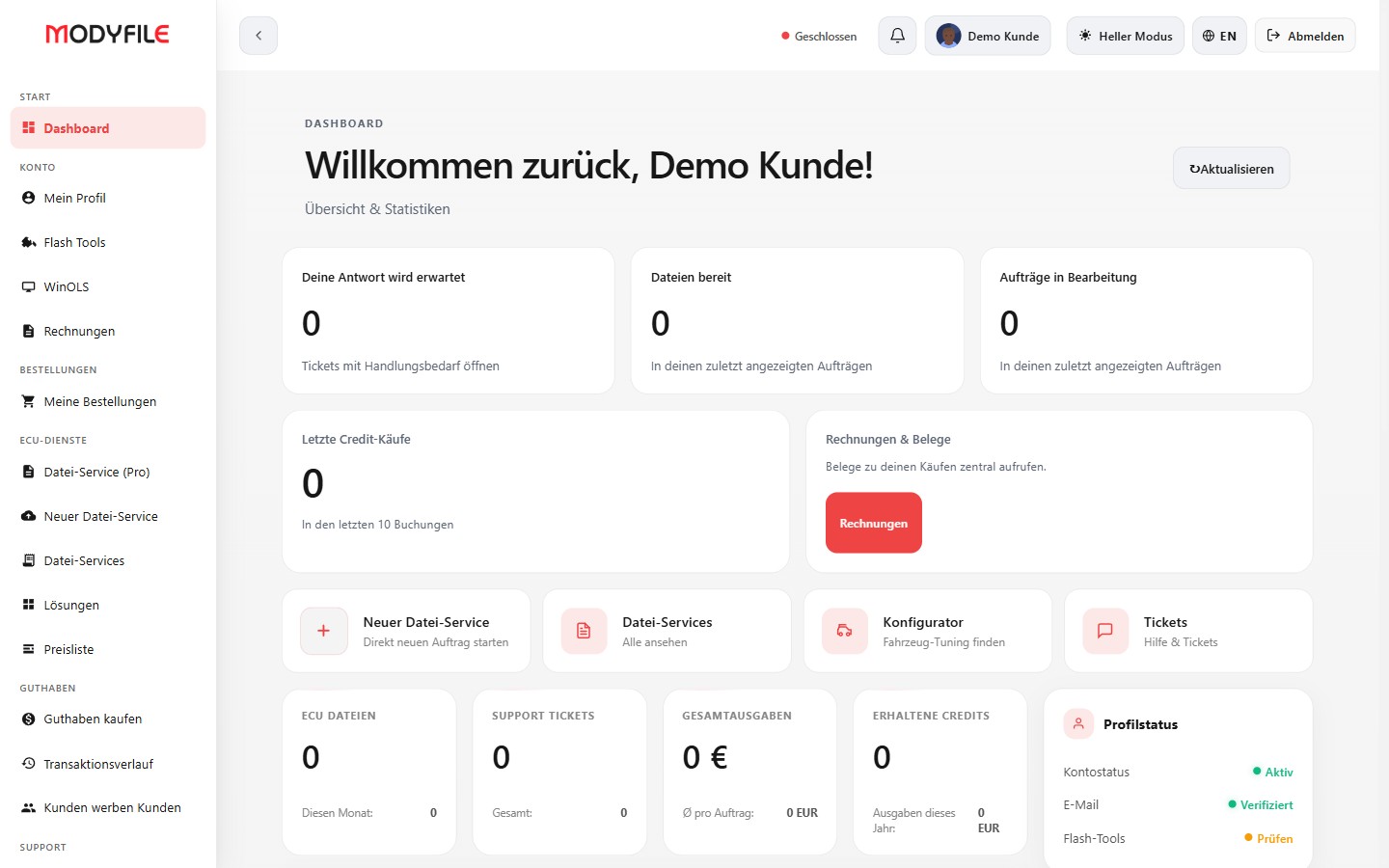
Product screenshots show an example configuration. The configurator is an optional add-on.
After upload, ECUident checks the original file. When it identifies the ECU, the wizard shows only matching catalogue vehicles. Manual selection remains available when there is no reliable match.
Customer accounts, order history and support tickets. Questions stay attached to the right file in the order chat.
Master, Slave and WinOLS credits. Set packages, discounts and customer-specific prices in your administration.
Your logo, colours and your own domain. Connect it in portal administration and use your brand with German and English interfaces, payments and invoices.
The AI assistant answers questions inside the portal. You can ask Flashy about features and booking right here.
DTC & BOSCH CODES
Two tools for everyday workshop tasks: understand fault codes and identify Bosch control units. Both are available as separate portal add-ons.
DTC stands for Diagnostic Trouble Code: a fault code reported by the vehicle’s diagnostic system. Search by code or by a term in its German or English description. The table shows the code and its recorded meaning.
Use it to make sense of a diagnostic message. Looking up a code does not change a file. Deactivating selected DTCs in a tuning file is a separate step in file automation.
+29 € / month in addition to the portal
How DTC processing works →Enter the Bosch number from the control unit. You can also search for part of a number using at least three characters. Matching database entries show the associated manufacturer and control unit type.
This helps you identify a control unit before your next step. The search provides reference data; it does not confirm compatibility with a particular tuning solution.
+29 € / month in addition to the portal
Choose your add-ons →ORIGINAL FILES & TOOLS
Upload original files from every provider. Manage your customers’ tools centrally in your portal, including these brands and tools.










YOUR CHIPTUNING ASSISTANT
Flashy answers questions about the portal, vehicles and file service. Tell it the model, year and engine; it asks focused follow-up questions when details are missing.
Stock figures, listed stage data and ECU names from the vehicle catalogue, with a clear distinction between data and estimates.
It explains tools, file workflows and solutions. Specific compatibility and available options depend on the ECU, software version and file.
It points to the right portal pages and asks for vehicle details for locations or videos. It will not claim to have found an unverified source.
START WITH CONFIDENCE
Launch your file service under your brand. Cancel your TuningPortal subscription monthly at the end of the current billing period. If it is not the right fit, request a refund of your first portal payment including add-ons booked with it within 30 days.
See pricing and termsSeparately purchased TuningFiles packages have their own terms and are excluded from this guarantee. Terms ↗
Do not enter confidential data. Verify vehicle and tool compatibility before flashing.